Apartment hunting tracker: every rental in one place
By PadPipe. Updated November 17, 2026
PadPipe is an apartment hunting tracker for renters. It keeps every place you are thinking about in one list: you paste a listing link or press the Chrome button, and it pulls what it can from the page (check the rent and fees, since some sites hide them), works out the real monthly cost, puts the place on a map and lets you drag it across a board from lead to signed lease. It runs on the web and on iPhone, with one account. Your first 7 days are free, then it is $4.99 a month.
7 days free, then $4.99 a month.
Want a free spreadsheet instead? Use our apartment comparison spreadsheet. The rest of this page is about what a tracker should hold, and how PadPipe does it.
What PadPipe does
- Saves a place from a link. Paste the link on the website or press the Chrome button on the listing. If a site hides a detail, you type it in.
- Shows real monthly cost and cash to move in for every place, side by side.
- Maps your places with layers for transit, groceries, gyms, parks and more, and estimated travel times to the places you choose.
- Moves each place across a board of stages, with notes, a gut feel rating and contacts on each one.
- Shares a board with a partner or roommate, and exports your list to CSV at any time.

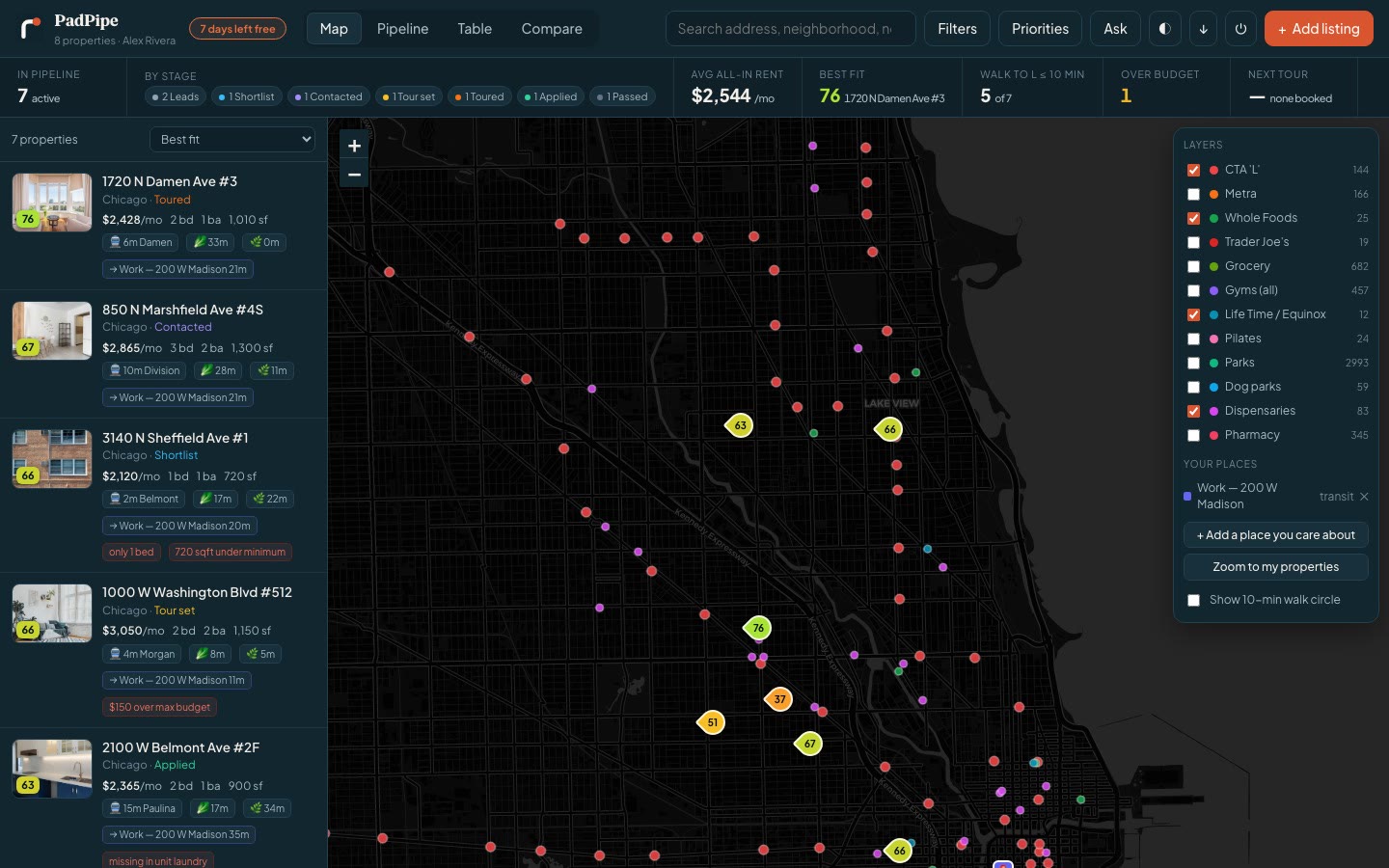
What a good tracker holds for every place
1. The link and the address
Listings get taken down, edited and posted again, so write down the street address and the unit as well as the link. In PadPipe you paste the link, or press the Chrome button on the listing, and it pulls what it can from the page. Check the rent and fees, and type in anything a site hides.
2. Photos
When a listing comes down, its photos usually go with it. That hurts most when you are trying to remember which kitchen was which. PadPipe stores its own copy of the listing photos it can reach, and on the web you can paste or drop in your own from a viewing.
3. Real monthly cost
Rent is only the sticker. Add monthly fees and the utilities you pay, take off any free months, and spread one-time fees over the lease. Listings rarely show all of this, so ask, then enter it. PadPipe does the math on each place and calls the result all-in monthly. The guide on how to compare apartments works through it line by line.
4. Cash to move in
Track this apart from the monthly number. It is what leaves your account before you get the keys: first month, deposit, move-in fee and broker fee. A place can be cheap each month and still be out of reach this month. PadPipe shows it next to the monthly cost.
5. Commute and what is nearby
Write down the door-to-door time to the places you go most. In PadPipe you add your own places, such as work or family, pick transit, walk, bike or drive, and say how much each one matters. Every saved rental then shows a time to each, and the map has layers for transit, groceries, gyms, parks and more. These times are estimates from distance, good for ranking. Check real routes once you have a short list.
6. Deal-breakers
Decide these before you fall for a kitchen. Think top budget, fewest bedrooms, pets, laundry, parking. Set a budget ceiling and your must-haves on the PadPipe website and it flags any place that goes over or misses one.
7. Stage
Every place should sit in exactly one stage, so you always know what to do next. PadPipe uses a board you drag across: Leads, Shortlist, Contacted, Tour set, Toured, Applied, Approved, Signed and Passed. You can rename the columns or add your own.
8. Contacts and dates
Note who you spoke to, how to reach them, when the viewing is and when the place is free. Each PadPipe place has fields for the contact's name, phone and email, and for the tour date and available date.
9. What you thought
Write your notes the same day, because three viewings blur into one by the weekend. Each place in PadPipe has notes and a one-to-five gut feel rating, on the web and on your iPhone. The website adds pros and cons and a walk-through checklist. For paper, print our apartment viewing checklist.
How to run your search from the tracker
- Set your rules first. Write down your top monthly number, the cash you can pay up front and your deal-breakers.
- Save everything that looks close. Do not judge yet. Everything lands in your first stage.
- Cut in one sitting. Go through the new places and remove the ones that break a rule. Move the rest to your shortlist.
- Contact, then book. Ask about fees and utilities at the same time, so the cost is filled in before you go.
- View with the same list every time. The same questions at every place are what make the answers comparable.
- Compare two to four at a time. Rank what is left on real cost and commute, then trust your gut on a tie.
- Keep the ones you pass on. Add why you said no. It stops you looking at the same place again when it is posted a second time. PadPipe's Passed stage is for this.
Using PadPipe as your tracker
PadPipe works on the web, on iPhone and as a Chrome button, all on one account, so a place you save on your laptop is on your phone when you get to the viewing. To hunt with someone else, share your board and you both work the same list. Your first 7 days are free, then it is $4.99 a month. You can export your list to a CSV file at any time, even after you cancel.
Run your whole search from one list
Paste a listing link and PadPipe pulls what it can from the page and maps it with travel times. Confirm the rent and fees, and it works out the real monthly cost for each place.
Start my tracker, free for 7 days7 days free, then $4.99 a month. Also on the App Store for iPhone and as a Chrome button.
Common questions
Is there a free apartment hunting tracker?
Yes. Our apartment comparison spreadsheet is free and needs no sign-up. PadPipe itself is free for 7 days, then $4.99 a month.
Can I share my tracker with a partner or roommate?
Yes. Invite them by email from your board and you both work the same places, costs and stages. They need a PadPipe account, but only the person who owns the board pays.
Does it work on my phone?
PadPipe has an iPhone app on the US App Store. There is no Android app yet, but the website works in a phone browser with the same account and the same list.
What if a listing site blocks PadPipe?
Use the Chrome button, which reads the page from inside your own browser when you press it. You can also type the details in by hand.
More renter guides
- Apartment viewing checklist: A free printable list of what to check and ask on every viewing.
- Questions to ask when renting: 40 questions on money, the lease, the building and the landlord, and why each one matters.
- How to compare apartments: Real cost, commute and deal-breakers side by side, with a worked example.
- Apartment comparison spreadsheet: A free CSV template that works out real monthly cost for you.
- How to spot rental scams: Red flags on Zillow, Craigslist and Facebook Marketplace, and what to do if you paid.
- First apartment checklist: Money, paperwork, setup and what to buy, in the order you need it.
- Move-in checklist: A room-by-room inspection with photo evidence that protects your deposit.
- Move-out checklist: Cleaning, repairs and paperwork that get your deposit back.