NEW One-click add with Chrome NEW  Save any listing without leaving the page · One-click add with the Chrome extension · Now on iPhone

7 days free · then $4.99 a month

Every place you like, in one pipeline.

One click saves any listing you are looking at — Zillow, Redfin, Apartments.com, Airbnb, a broker’s own site, a link someone texted you. PadPipe keeps the photos and the numbers, works out what each place really costs a month, and moves it along your board from “maybe” to signed.

Web Chrome iPhone

Cancel any time Ready in one minute Your list stays private

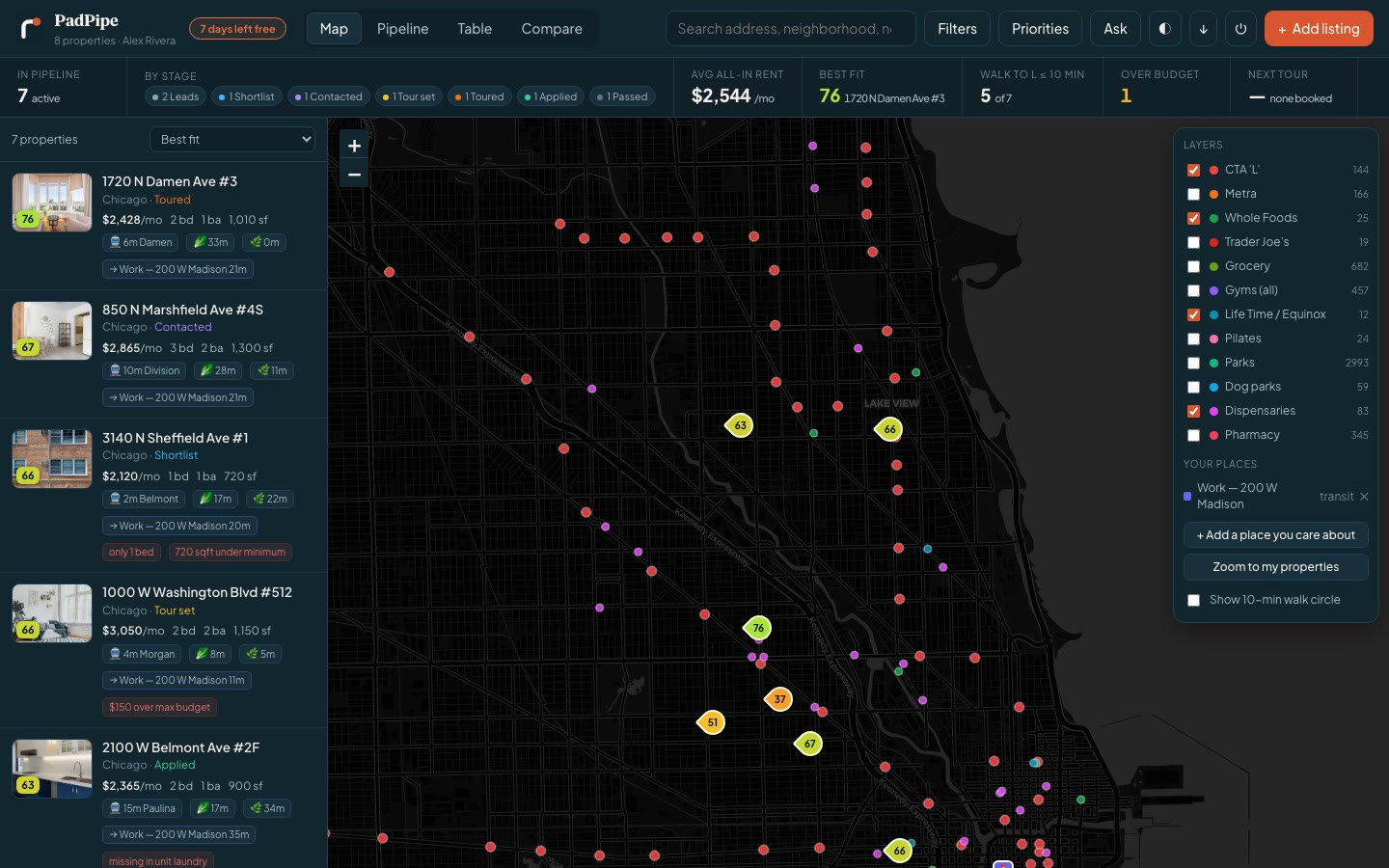
The PadPipe map with six saved Chicago apartments, each pin showing its score.
76 $2,428all-in / month
6 minwalk to the train

Save from

  • Zillow
  • Redfin
  • Apartments.com
  • Airbnb
  • Zumper
  • Trulia
  • StreetEasy
  • …and anywhere else

The problem

Apartment hunting turns into a mess.

You open twenty tabs. You start a spreadsheet. Two days later you cannot remember which place had the good kitchen — and the one you liked is already gone.

  • Listings disappear.Good ones rent in days. The link dies and the photos go with it.
  • The price is not the price.Fees, heat, parking and move-in money change the answer every time.
  • The map is in your head."Close to the train" means nothing until you see the walk in minutes.
Two people on a couch comparing apartment listings on a laptop.

How it works

Three steps. About one minute.

No setup. No import. No spreadsheet to build.

1

One click, or paste a link

On a listing? Press the Chrome button and you are done. Otherwise paste the web address. Either way PadPipe pulls in the address, the rent, the beds, the size, the amenities — and every photo, not just the first one.

A listing link pasted into PadPipe, which reads it and drops the place on the map.
2

See it on the map

Each place gets a pin. Turn on the layers you care about — trains, grocery stores, gyms, parks, dog parks, pharmacies — and add addresses of your own, like work or the gym you actually go to.

Map layers switching on and off: groceries, parks, dog parks, pharmacies.
3

Pick with confidence

Every place gets one score, built from what you said matters. Move places along your board as you tour, apply and decide. When two are close, ask the built-in assistant which one wins, and why.

A place being moved along the board from leads to shortlist to contacted.

The number that matters

What it really costs, every month.

Two apartments can both say "$2,400" and be hundreds of dollars apart. PadPipe adds the fees, adds the utilities you pay, spreads the move-in money across the lease, and takes off any free months.

Then it sorts your list by that number instead of the sticker. You stop guessing and start comparing the same thing.

Listed at $2,400 a month really $2,240

Rent$2,400
Monthly fees (pet, trash, amenity)$85
Heat and electric you pay$110
One free month, spread over the lease−$200
Move-in fee, spread over the lease$45
Real monthly cost$2,240

An example, using the same math PadPipe runs on every place you save.

The Chrome button · new

One click, from
anywhere on the web.

You are already on the listing. Do not copy the link, do not switch tabs, do not come back later and try to remember which one it was. Press the PadPipe button and it is in your pipeline before the page finishes scrolling.

  • It reads the page you are looking atFrom inside your own browser — so it works even on sites that block everyone else. Address, rent, beds, size, amenities and every photo.
  • It works on any listing siteZillow, Redfin, Apartments.com, Domu, Zumper, Trulia, StreetEasy, a management company's own page, a Craigslist post. If it is a rental listing, press the button.
  • It asks for nothing it does not needNo standing permission to read your browsing. It only sees the page when you press the button. That is the whole permission model.

It is on the Chrome Web Store — one click, no files to unzip.

www.zillow.com/homedetails/1720-N-Damen-Ave-APT-3-Chicago-IL-60647/
A listing page open in a browser, with the PadPipe button highlighted in the toolbar.
$2,450/mo2 bd · 1 ba · 1,010 sqft · 1720 N Damen Ave #3
Saved to PadPipe12 photos · scored 76 · 6 min to Damen

iPhone app · new

The list in your pocket,
where you actually tour.

Standing outside the building is the moment you need the numbers — the all-in cost, the walk to the train, what you wrote about the last place. Same account, same pipeline, nothing to sync.

The PadPipe iPhone app showing saved apartments as scored pins on a map of Chicago.
The PadPipe iPhone app showing saved apartments as cards with photos, scores and all-in monthly cost.
One apartment open in the PadPipe iPhone app, showing the score broken down into reasons.
1

Made for one hand

One screen. Your places as cards, a map, and a place to write things down. No tab bar, because there is only one thing to do here.

2

Add from the sofa

Copy a link in Safari, open PadPipe, and it offers to paste it. Two taps from listing to pipeline.

3

Notes while you stand there

Water pressure. Street noise. The smell in the hallway. Write it in the kitchen, not four hours later.

4

Nothing to sync

One account across the web, Chrome and the phone. Save it on your laptop, it is on your phone before you have got your shoes on.

Inside the app

Open one place and the whole argument is right there.

Not a row in a sheet. The photos, the all-in price, the walk times, and the reason it scored what it scored.

app.padpipe.com
An apartment open in PadPipe: photos, $2,428 all-in per month, and a score of 76 broken into its reasons.
1

The all-in price, up top

$2,428 a month, not the $2,450 on the listing. Fees, utilities and the free month are already in it.

2

The score, explained

Each bar is a reason. "6 min walk to Damen" scored 78. "33 min walk to Whole Foods" scored 13. Nothing is a black box.

3

Your weights, not ours

Care more about the train than the store? Slide it. Every place re-scores in a second.

4

Everything in one drawer

Money, location, tour notes and the full history of the place — tabs, not twelve browser windows.

The assistant

Ask the things the listing
never tells you.

It has read every place you saved, knows the addresses you care about, and knows what you said matters. So you can ask it like you would ask a friend who did the legwork.

  • Which one is closest to a post office?
  • Which has a bus stop within five minutes?
  • Cheapest once the fees are in?
  • Compare Damen and Marshfield for a dog.
  • Which is the shortest trip to work on a Monday?
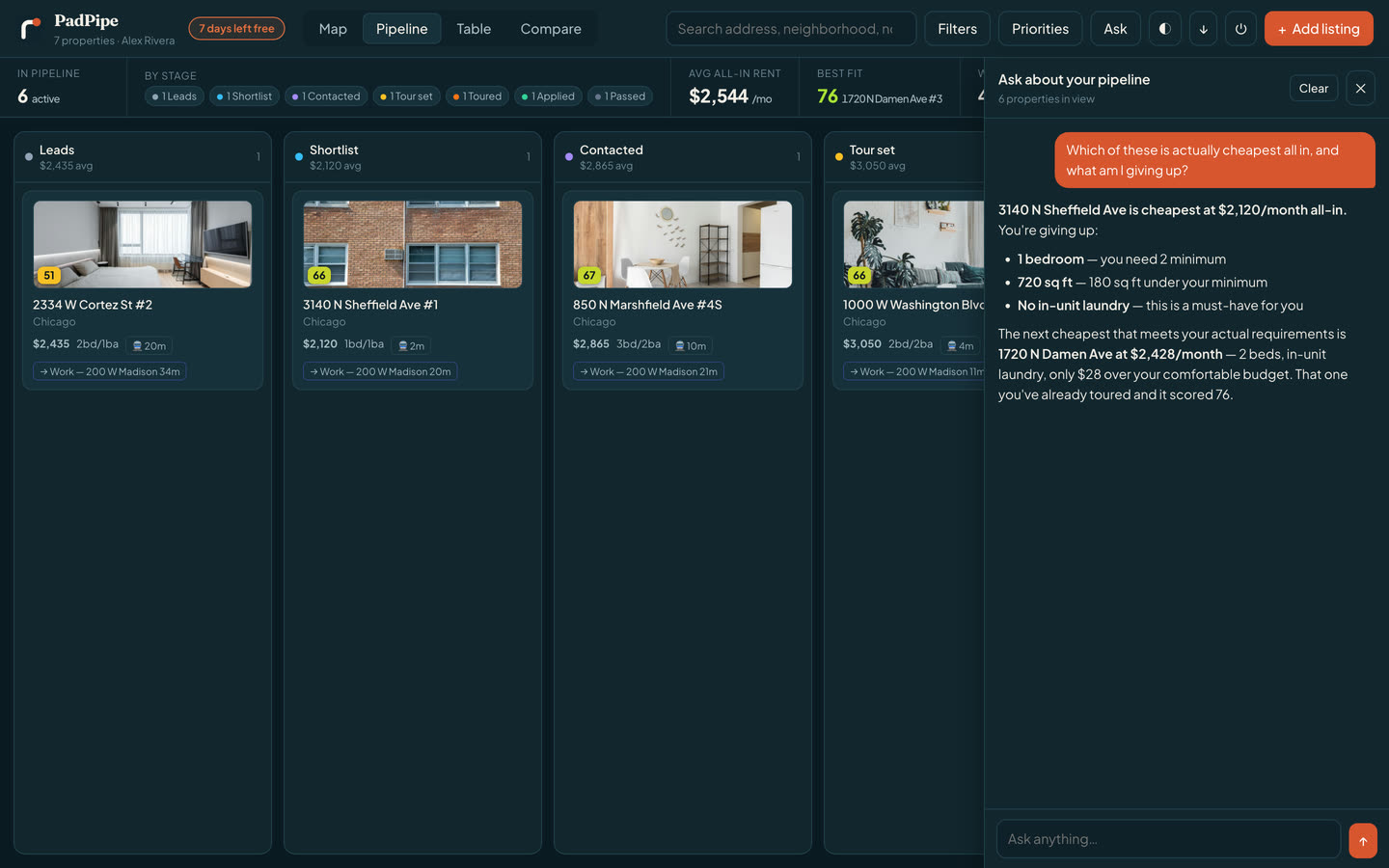
  • What am I giving up if I pick the cheap one?
app.padpipe.com
The PadPipe assistant answering which saved apartment is cheapest all in, naming 3140 N Sheffield at $2,120 a month and explaining what you give up for it.

It looks things up

Walk times, fees, the real monthly cost, what is near each address. It reads your pipeline instead of guessing.

It learns what you weigh

Tell it the train matters more than the store and the whole list re-sorts. Your priorities, not an average renter’s.

It shows its work

Every answer points at the number it came from, so you can disagree with it.

What you get

Built for the whole hunt, not just the search.

From the first link you paste to the day you sign.

One click, from anywhere

The Chrome button saves whatever listing you are looking at — any site, photos and all, without leaving the page.

A real map

Pins for your places. Dots for trains, groceries, gyms, parks and pharmacies. Turn each layer on or off.

Real monthly cost

Fees, utilities, free months and move-in money, folded into one honest number.

Walk times, not vibes

The minutes to the train, the store, and any address you add — like your office.

A board for the process

Lead, touring, applied, approved, signed, passed. Drag a place along as things move.

Private by default

Your list is yours. No ads, no lead selling, and no agent gets your number because you looked.

An assistant that reads your list

"Which of these is cheapest all in?" It answers from your own places and numbers.

On your phone too

The iPhone app puts the whole list, the map and your notes in your pocket, where you actually tour.

Why not a spreadsheet

You have tried the other two ways.

How PadPipe compares with a spreadsheet and with open browser tabs
 Browser tabsA spreadsheetPadPipe
Keeps the photosGone when the listing goesNoYes — all of them
Adds up the true costNoOnly if you build itAutomatic
Shows walk timesNoNoTo the minute
Puts it all on one mapNoNoYes
Tracks where each place standsIn your headA column you updateA board you drag
Time to add one place3–5 minutes of typingOne click
Comes with youOne computerIf you remember to open itWeb, Chrome and iPhone

Pricing

One plan. Less than a coffee.

Try everything free for a week. Keep it for $4.99 a month, or walk away — your call, no phone call.

First 7 days free
$4.99/ month

after your free week

  • As many apartments as you want
  • Every photo from every listing
  • The map, the layers and the walk times
  • Real monthly cost and scoring
  • The Chrome button and the assistant
  • Export everything, any time
Start your free week

Cancel any time in one click. Most people find a place in a month or two — then stop paying.

Where it works

Fifteen metros, ready to go.

Pick your city when you sign up and the map fills in for you — train stations, grocery stores, gyms, parks and pharmacies already on it. Moving somewhere else? Add another city any time.

A colourful apartment building with balconies, seen from the street.

Straight answers

What we do with your list: nothing.

Most rental sites make money when your phone rings. We make money when you pay us $4.99 — so we work for you.

Your data stays yours

Only you can see your places, your notes and your budget. We do not sell leads and we never pass your details to an agent.

No ads, ever

Nothing on your map is a paid spot. A store shows up because it is there, not because someone bought the pin.

Leave whenever

Cancel in one click. Export everything to a spreadsheet. Delete your account and it all goes with it.

Questions

Good things to ask.

What does it cost?

Your first 7 days are free. After that it is $4.99 a month. You can cancel in one click, and you keep access until the month you paid for runs out.

Which sites can I paste links from?

Zillow, Redfin, Apartments.com, Domu, Zumper, Trulia, StreetEasy and most others. If a site blocks us from reading the page, the Chrome button reads it from your own browser instead — and you can always type the details in by hand.

What is "real monthly cost"?

It is the rent, plus the monthly fees, plus the utilities you pay, minus any free months, plus the move-in money spread across the lease. It is the number you should compare, because two places at the same rent are often not the same price.

How are walk times worked out?

We measure the straight-line distance and adjust it for city blocks. It is a fast, honest estimate — close enough to rank places. For an exact route, use your maps app once you have a short list.

How does the Chrome button work?

You press it while you are on a listing, and it reads that page from inside your own browser — which is why it works on sites that block outside requests. It asks for no standing permission to watch your browsing: it can only see a page at the moment you press the button. Add it from the Chrome Web Store.

Is there an iPhone app?

Yes — PadPipe is on the App Store, free, and it is the same account and the same pipeline as the website. Nothing to sync: save a place on your laptop and it is on your phone. An Android app is not built yet, but padpipe.com works well in a phone browser.

Can I use it in my city?

Fifteen metros are ready today, including Chicago, New York, Los Angeles, Seattle and Austin. You can save a place anywhere; the map layers are what we build city by city.

Do you sell my information?

No. We do not sell leads, we do not run ads, and no agent or landlord gets your name because you saved their listing.

Can I share my list with a roommate or partner?

Not yet — each account is private today. You can export your list to a spreadsheet and send that. Shared lists are the thing we get asked for most, so they are next.

Start now

Your next apartment is in one of those tabs.

Paste the first link and watch it land on the map. It takes about a minute, and the first week is free.

Start your free week

$4.99 a month after that. Cancel any time. No spam, ever.